
St. Croix Active Warrant Search
Sheriff Scott Knudson's Office posts its wanted entries through the St. Croix County Warrants portal, part of the county's public-safety system. The page is labeled "Active Warrant list." It carries the note "Subject to confirmation by Law Enforcement." That caution is worth heeding. You will find no Most Wanted photo gallery here, no reward board, no "Warrant Wednesday" feature. There is not even a stated refresh schedule. It is a working search tool, plain and simple.
Treat the portal as a starting point for an outstanding-warrant question. It cannot confirm that a row matches the person you have in mind. Warrant status can shift through service, recall, a court order, or a routine data correction. For someone possibly held in county custody, the booking and roster lookup takes a separate inmate route. It never substitutes for warrant confirmation.
The two systems answer different questions. The roster covers people in custody at the jail right now. The warrant page lists active warrant entries. A person released from jail may vanish from the roster while the warrant still stands. A transfer to Wisconsin Department of Corrections custody is a separate status entirely. A court case, filed later, may hold details the warrant table never shows.
Note: St. Croix County offers an active-warrant search, not a promise that every result is current or photo-rich.
St. Croix Warrant Listing Fields
The portal works as a narrow record display. You can filter results by name, sex, date issued, charge, age, and bond amount. The visible columns stop there. Keep in mind that age is just a display field, not proof of identity.
| Field | What the active-warrant display shows |
|---|---|
| Name | The name carried in the active-warrant entry. |
| Sex | A portal filter and displayed identifying field. |
| Age | An age display, rather than a full date of birth. |
| Bond amount | The amount shown by the entry, not proof of a case outcome. |
| Date issued | The date displayed for the warrant entry. |
| Charge | The charge text displayed in the active-warrant table. |
No mugshot column appears in the configured table. So a wanted-fugitives page here is not a photo resource. Its value lies elsewhere. It points to the Sheriff's warrant channel directly and to the path for court confirmation, not to pictures or name-based guesses.
The official active-warrant interface shows what visitors actually get. Expect filters and text columns. Booking and warrant photos are simply absent.
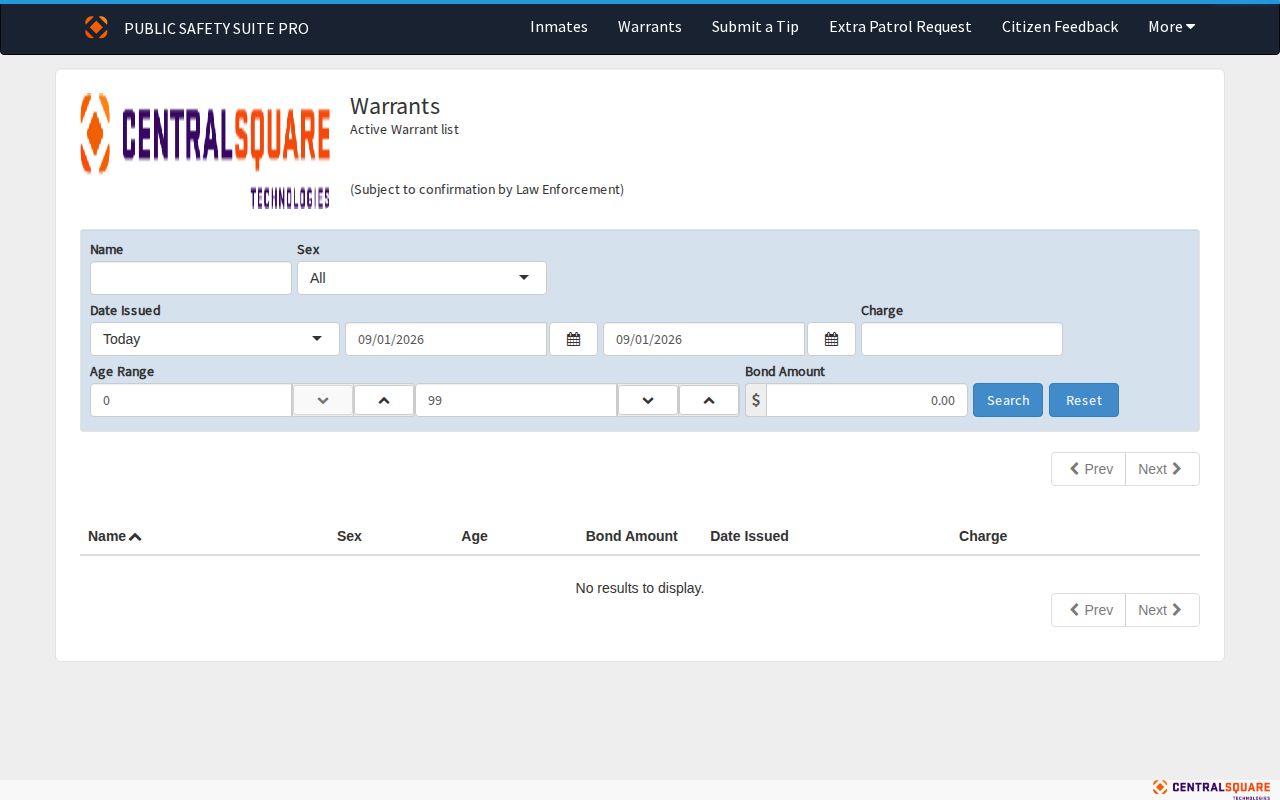
The missing image column reflects a local portal setting. It says nothing about whether an agency photograph exists in some other record.
Use St. Croix Warrant Results Safely
Begin with the smallest reliable facts. A name plus a date works well. Never identify someone from a partial match, an age range, or outside knowledge. The filters help narrow a search. Still, any apparent match needs official confirmation before it counts as an active legal status.
- Open the Sheriff’s active-warrant portal and search by name first.
- Use a known sex, date issued, charge, age, or bond field only to narrow the displayed lead.
- Read the entry as an active-warrant pointer, including its law-enforcement confirmation warning.
- Contact the Sheriff, non-emergency dispatch, or the issuing court to confirm an apparent match.
- Use the court record to follow a filed case, rather than treating the warrant table as the case outcome.
Charges can change, be dismissed, or resolve in ways the table never explains. Matching the court record to the right person comes first.
A good result should lead to confirmation, not public speculation. The Sheriff's built-in warning admits that statuses change. It also admits that display fields are limited. Treat a search hit as information. Never treat it as an instruction to track someone down. For an immediate safety concern, call emergency dispatch.
Confirm a St. Croix Warrant
No separate county clerk warrant-search portal exists locally. The practical sequence runs from the Sheriff's search to a confirmation call. Then it goes to the issuing court or Clerk of Courts when needed. The Wisconsin Circuit Court Access search, known as WCCA, shows a case's events, filings, hearings, and disposition. It connects a warrant lead to court activity. It will not clear a warrant.
- Check the active-warrant portal for a possible St. Croix County result.
- Call the Sheriff’s Office at 715-381-4320 or non-emergency dispatch at 715-386-4701 to confirm the current status.
- When a court is identified, contact the issuing court or Clerk of Courts for the court-side record.
- Review WCCA for a matching St. Croix County case, using more than a name when possible.
- If the question concerns one’s own legal status, speak with an attorney or the court. No online result can provide personal legal advice.
Need a warrant confirmed in person? The St. Croix County Circuit Court sits at 1101 Carmichael Road, Suite 1600, Hudson, WI 54016, open weekdays from 8:00 a.m. to 4:30 p.m. Anything not in WCCA has to be requested from the court where it was filed.
Watch out for name mix-ups. WCCA can pull up several people who share a name, and a dated case event says nothing about whether a warrant stands today. The Sheriff or the issuing court can settle the question, since they know the legal status behind a portal entry. Case records help you follow a matter, but a phone call is what confirms it.
St. Croix Warrant Type Limits
One word covers a lot of ground. People say "warrant" when they mean several different court orders, and the distinctions matter. The table gives plain-language meanings only. A bench warrant and an arrest warrant come from different situations, even if the paperwork looks similar at a glance.
| General term | Plain-language meaning | What the St. Croix portal establishes |
|---|---|---|
| Arrest warrant | A court-authorized warrant used to take a person into custody in connection with an alleged offense. | The portal may show an active entry, but its public table does not label this category. |
| Bench warrant | A warrant issued by a court, often connected to a missed court obligation or another court-directed matter. | The portal may show an active entry, but confirmation with the issuing court is required. |
Here is the catch with St. Croix County's active-warrant portal. Its displayed fields never sort entries into arrest warrants or bench warrants. So the entry itself, plus the court that issued it, remains the real source for what a particular record means. Treat these definitions as a starting point. They are no substitute for charge text or a court order.
Note: The county's portal also warns that law enforcement must confirm any result before acting on it.
St. Croix Warrant Tips
Spotted someone on the St. Croix County list? The portal offers a Submit a Tip route for anything that might help investigators. The setup is simple. You get a text field and a CAPTCHA. That is the whole form. One caution applies, though: nothing on the page promises anonymity, so weigh that before you type anything about a warrant or fugitive sighting. There is no Crime Stoppers reward program here. The Sheriff's Office has no reward schedule either. A web form alone, in short, guarantees nothing.
Emergency or immediate danger: 911
St. Croix County Sheriff’s Office: 715-381-4320
Non-emergency dispatch: 715-386-4701
St. Croix County Sheriff’s Office, 1101 Carmichael Road, Suite G100, Hudson, WI 54016
The official tip interface itself tells the story: a text box, a CAPTCHA, and that is it. There is no anonymity pledge anywhere on the page.
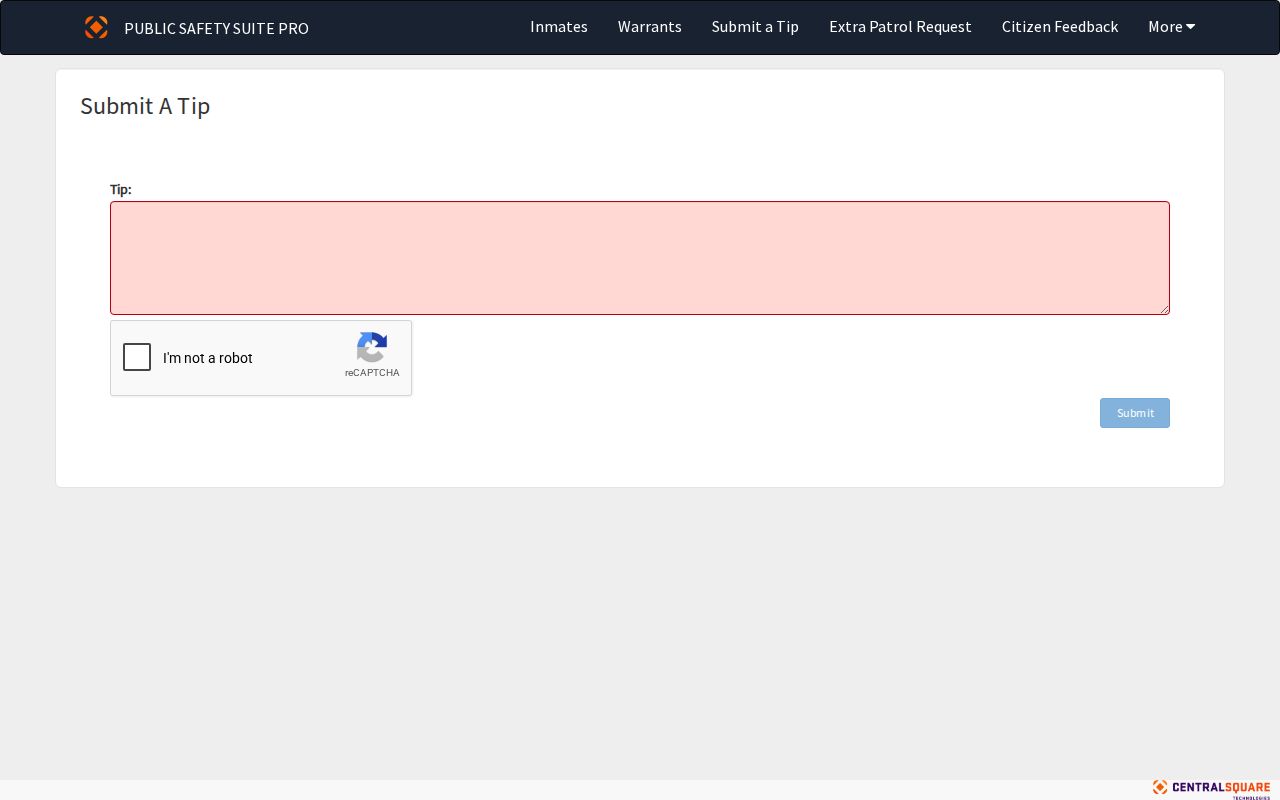
Call in what you know, and let the professionals handle the rest. Give facts a deputy can verify. Decide nothing about locations, arrests, or responses yourself. A tip line exists to pass along information, nothing more. It cannot confirm whether a warrant stands, and it will not report back any court outcome.
St. Croix Warrant Portal
One browser-based public-safety portal carries all three of the county's related functions: inmates, warrants, and tip submission. No official Sheriff app exists for jail or warrant searches. The Sheriff points to its Facebook page and Wisconsin Crime Alert, yet nothing published promises those channels list every booking, every active warrant, or photos on a steady schedule.
So start with the portal and a confirmation call rather than a social feed. Custody today? Use the inmate route. A warrant question? Use the warrant route. Court outcomes belong to WCCA and the Clerk of Courts. Those are separate records, and keeping them separate matters.
The portal bundles these functions for convenience only. It does not mean each route holds the same data. The inmate route tracks current county custody, the warrants route tracks active entries, and the tip form simply sends information to the agency. None of them settles a court outcome. That distinction counts most when an old post or stale search result outlives the actual status it described.